


A Web3 KOC campaign reporting template 2026 should connect creator posts to identifiable visits, eligible product actions, and later user activity. A report of impressions, likes, and wallet connections alone cannot tell a team whether a campaign brought in people who used the product. The practical answer is a four-layer report: delivery, traffic, verified activation, and retention, with exclusions and attribution uncertainty shown alongside the totals.
This template is for growth teams running campaigns with key opinion consumers (KOCs): smaller creators or active users whose product experience is part of the campaign. It is not a promise that every on-chain action can be traced to one post. Use it to make the evidence visible and the next spending decision defensible.
Key Takeaways
- Report creator delivery, attributable traffic, verified activation, and retained behavior as separate layers.
- Define one eligible-user rule before launch; keep excluded and unverified activity visible.
- Join creator links to product events, but label unattributed and overlapping paths honestly.
- Compare creators by qualified outcomes and cost, not audience size or reactions alone.
- Reconcile the report at a fixed cutoff so late events do not silently rewrite results.
Contents
- Define the outcome before collecting data
- Build a four-layer measurement model
- Set up creator-level tracking
- Verify real users and reconcile cohorts
- Copy the reporting template
- Turn the report into a decision
What a Web3 KOC Campaign Report Must Answer
A useful report answers five questions: What did each creator publish? Who reached the product through a trackable path? Which people completed the intended product action? Which of those people returned or completed a second meaningful action? What portion of the result remains uncertain or excluded?
The KOC brief should establish the audience and promised action before reporting begins. This article starts once the campaign has an objective and explains how to account for what happened.
Step 1 — Define an Eligible Outcome Before Launch
Choose one primary activation event that reflects genuine product use. A wallet connection may be a prerequisite, but it is not the same as a swap, deposit, completed onboarding flow, or qualified lead. For a community campaign, an eligible action might be a substantive first contribution followed by another contribution during the measurement window; a join count alone is insufficient.
Write the rule in plain language and in machine-readable fields. Specify the event name, required parameters, allowed markets, deduplication key, exclusion rules, and the cutoff timestamp. Google Analytics lists events such as sign_up, login, generate_lead, and purchase as recommended events, but says they are not automatically sent; your implementation must actually emit and validate the events. Google Analytics recommended events
| Project | Primary activation example | Follow-up signal | Caution |
|---|---|---|---|
| Wallet | Completed wallet setup and first supported product action | A second product action | Do not equate installations with active users. |
| DeFi | Eligible protocol transaction | Repeat eligible transaction | Exclude self-transfers and test activity under a written rule. |
| Layer 1/2 | First meaningful application action | Another application action | Raw wallet creation can include low-intent activity. |
| Exchange | Account onboarding step allowed by policy | Qualified trading or funding event | Do not treat referral clicks as traders. |
These are example definitions, not universal standards or ChainPeak performance claims. Product, market, and legal teams should agree on the definition before the first creator goes live.
Step 2 — Build the Four-Layer Measurement Model
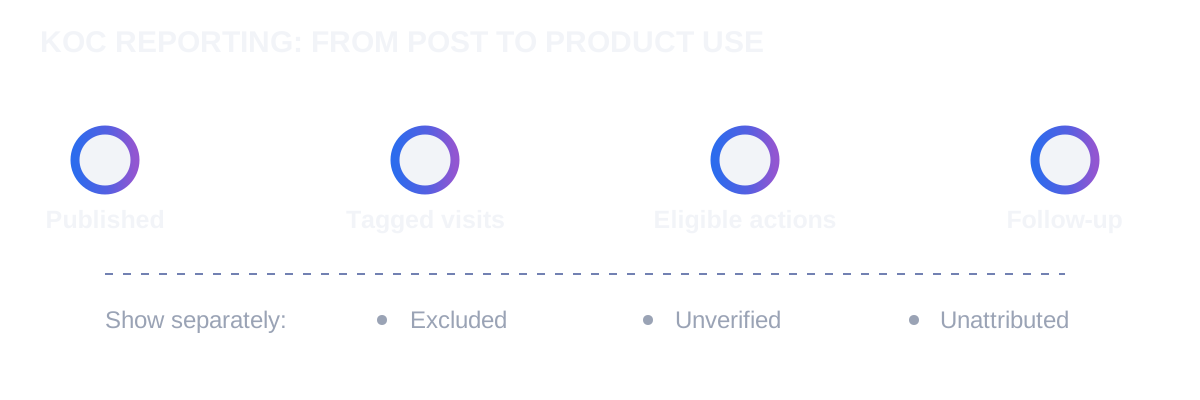
The reporting funnel is published content → tracked visits → eligible activation → retained action. Keep each layer separate because its denominator and evidence differ. A creator can deliver posts on time while generating weak activation; another can have modest reach but bring relevant users.
| Layer | Minimum fields | Source of truth | What it cannot prove |
|---|---|---|---|
| Delivery | Creator ID, post URL, publish time, format, disclosure check | Creator log and post archive | That a real user saw or acted on the post |
| Traffic | Tagged sessions, landing page, market, campaign ID | Web/app analytics | That the visitor is unique or eligible |
| Activation | Qualified event, user or account key, event timestamp, exclusions | Product event store | That a specific creator caused the action |
| Retention | Eligible follow-up action, cohort date, observation window | Product event store | Future lifetime value |
Report impressions and engagement as delivery context, not as the final result. If a creator platform offers only estimated reach, label it as platform-reported. Never sum impressions from different platforms into a unique-person count. For a fuller acquisition measurement approach, see ChainPeak’s real-user growth playbook.
Step 3 — Set Up Creator-Level Links and Event Capture
Assign every creator a stable ID and one or more tagged destination links. Google documents utm_source, utm_medium, utm_campaign, and utm_content; it also notes that campaign parameters can appear in traffic-acquisition reporting. A consistent naming convention prevents one campaign from splitting into many rows. Google Analytics campaign URL guidance
An illustrative link pattern is ?utm_source=telegram&utm_medium=koc&utm_campaign=wallet_onboarding_2026&utm_content=creator_014. This is a naming example, not a live campaign link. Store the exact final URL, redirect path, post URL, publish timestamp, and creator ID in the report. Test both desktop and mobile paths, including deep links that leave a browser for an app.
Use a campaign ID to join web analytics to product events where consent and your data architecture permit. Keep raw event IDs and timestamps so the report can be audited. Test the event stream before launch; Google recommends its DebugView and Realtime report for checking that events arrive. Google Analytics DebugView guidance Record the attribution rule—such as first eligible tagged visit within a stated window—before looking at outcomes; changing it afterward can produce a more flattering but less comparable result. The KOL attribution checklist covers the wider tracking setup; KOC reporting adds the eligible-user and cohort reconciliation below.
Step 4 — Verify Real Users and Reconcile the Cohort
A real-user report needs a documented eligibility rule, not a label assigned after the fact. Deduplicate at the level appropriate to the product: account, permitted device identifier, verified wallet cluster, or another privacy-reviewed key. A wallet is not necessarily a person, and one person may control several wallets. Avoid publishing personal identifiers in the shared report.
Create explicit exclusion categories: internal testers, known campaign staff, duplicate events, invalid geography, incentivized activity outside campaign rules, and suspicious coordinated behavior. Mark an action as unverified when the evidence is insufficient; do not quietly add it to the qualified total. A suspicious pattern should trigger review, not an automatic accusation of fraud.
Choose a fixed observation window. For example, a team might inspect an illustrative 7-day activation window and a 30-day follow-up window after first eligible action. These are template settings, not industry benchmarks. If the report closes before all users have a full 30 days of observation, show the cohort as immature rather than reporting a deceptively low retention rate.
Some users will see multiple creators or arrive without intact tags. Show three buckets: creator-attributed, campaign-associated but creator-unknown, and unattributed. Document your deduplication and overlap rule in the appendix. A deterministic tagged visit can support an attribution label; it does not by itself establish that the post caused the conversion.
Step 5 — Copy the Web3 KOC Campaign Reporting Template
The following fields can be copied into a spreadsheet or analytics workspace. Preserve a row-level evidence tab and publish only aggregates to stakeholders where privacy requires it.
A. Campaign header
Campaign name:
Campaign ID:
Product and target market:
Primary eligible action:
Eligibility and exclusion rules:
Attribution rule and lookback window:
Activation window:
Follow-up window:
Reporting timezone:
Data cutoff timestamp:
Report owner and approver:
B. Creator delivery and quality log
| Field | What to record |
|---|---|
| Creator ID and platform | Stable internal ID, channel, market, language |
| Agreed deliverable | Format, post date, destination, agreed disclosure |
| Evidence | Live post URL, archived copy, screenshot when needed |
| Actual delivery | Publication timestamp, edits, takedowns, exceptions |
| Content quality note | Product accuracy, useful questions, support issues |
| Cost | Creator payment, rights, production, tracking, and other allocated costs |
If a KOC receives payment, free access, tokens, or another material benefit for an endorsement, review local disclosure obligations. The U.S. FTC says material connections should be made clear in social endorsements; it also explains that free or discounted products can create such a connection. FTC influencer disclosure guide
C. Outcome summary by creator
| Creator ID | Posts live | Tagged visits | Eligible activations | Excluded / unverified | Follow-up users | Total cost | Cost per eligible activation |
|---|---|---|---|---|---|---|---|
| creator_014 | [input] | [input] | [input] | [input] | [input] | [input] | [calculated] |
| creator_015 | [input] | [input] | [input] | [input] | [input] | [input] | [calculated] |
Calculate cost per eligible activation = total allocated campaign cost ÷ eligible activations. If the denominator is zero, show “not calculable,” not zero. Report follow-up rate only for cohorts whose full observation window has passed, using follow-up users ÷ eligible activated users in mature cohorts. Keep all costs in one currency and state whether tax, content rights, agency fees, and incentives are included.
D. Exception and evidence register
Creator ID / campaign ID:
Exception type:
Affected event IDs or aggregate count:
Reason and evidence link:
Reviewer:
Decision: include / exclude / unverified
Decision timestamp:
Impact on reported metric:
An exception register prevents silent changes when creators edit posts, links break, events arrive late, or suspicious activity is reviewed. Version the report and keep the prior cutoff visible. That makes a later correction understandable rather than looking like an unexplained change in performance.
Step 6 — Turn the Report Into a Decision
Review the report in two passes. First, verify data quality: broken links, missing event parameters, duplicate counts, immature cohorts, and costs that were left out. Second, compare creators against the campaign objective. A creator with fewer tagged visits but more eligible activations may deserve another test; a creator with high engagement and no qualified actions may need a different audience, message, or destination.
Write one decision per creator: continue, revise, pause, or retest. Give the reason and the evidence, not just a score. Where attribution is weak, say so and make improved tracking the next action. Do not interpret a short campaign window as proof of long-term value.
For strategy rather than reporting mechanics, read ChainPeak’s Web3 KOC real-user playbook and its KOC vs KOL comparison. The two articles answer how to run a program and when to choose each creator type; this template answers what evidence to bring to the review meeting.
Conclusion
A Web3 KOC campaign reporting template 2026 works when it shows the entire path from delivered posts to verified product behavior, including exclusions, immature cohorts, and unknown attribution. Define one meaningful action before launch, tag every creator link, record events consistently, and close each report at a stated cutoff. The result is a repeatable decision record—not merely a collection of engagement screenshots.
